Gatsby reports
Learn how to generate a report for Compass+ and how activities are mapped to benchmarks.
Contents
Generating a Gatsby report for Compass+
The Gatsby reports page allows you to generate a benchmark report for import into Compass+.
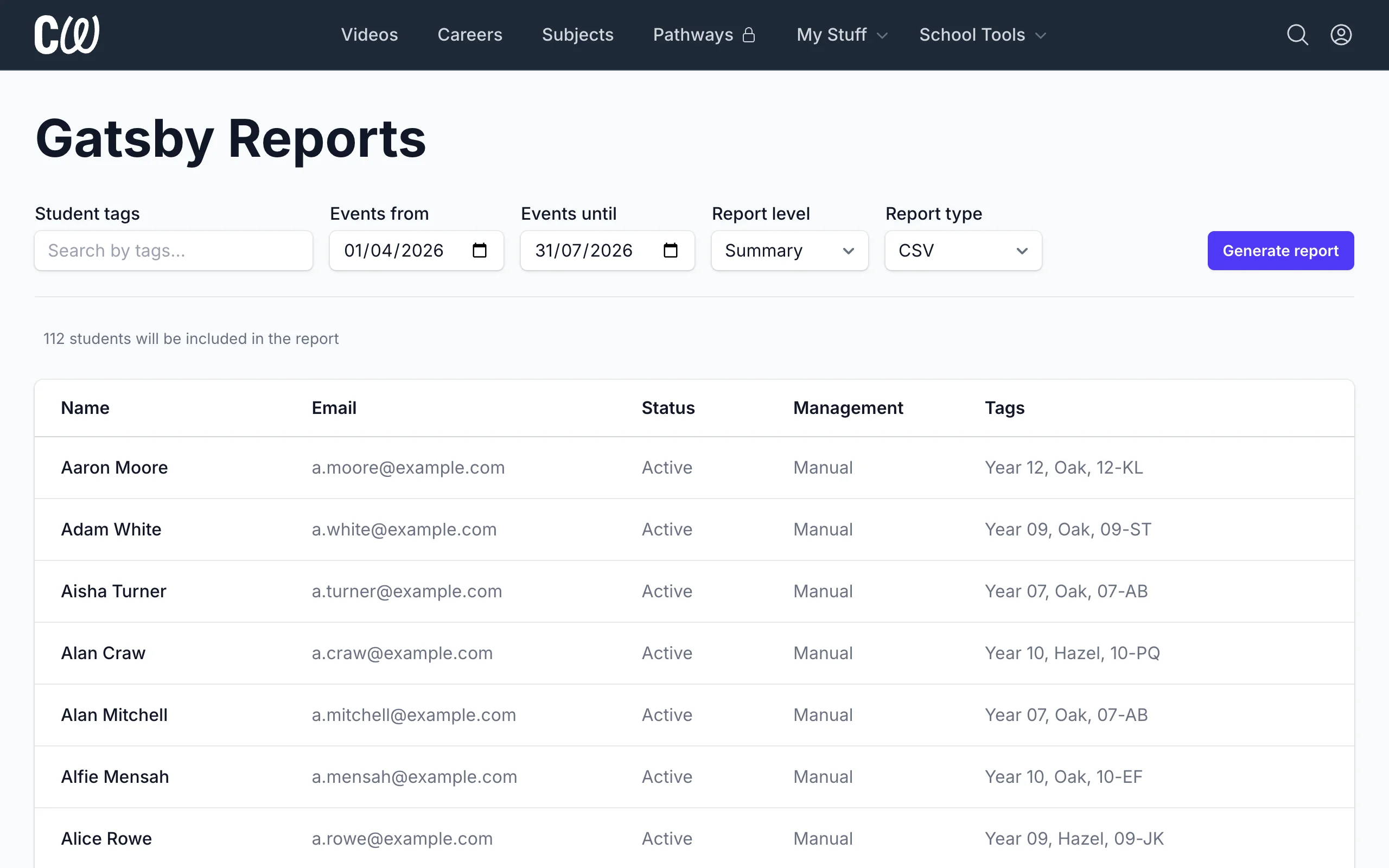
You can filter the contents of the report using:
- Student tags (Year, Registration, House, etc)
- Events from/until (maximum range last 6 months)
You can also select one of two types of report:
- Summary
- Detailed
See below for more details on Summary vs Detailed reports.
Click Generate report to create your report. You'll receive an email with a link when it's ready.
Benchmark 2 – Learning from career and labour market information
The following platform activities are mapped automatically to Gatsby Benchmark 2:
- Student viewed a career profile
- Student added a career profile to their list of favourites
- Student added a personal reflection about a career profile
Career profiles give students high-quality, up-to-date information about careers, pathways and the labour market: what a job involves, the routes in, and where it can lead. Reading a career profile, saving one, or reflecting on it helps a student access and use that information to inform their own decisions.
Benchmark 2 also calls for the support of an informed adviser to help pupils make the best use of this information. Coffee With is built to support that adviser, not replace them.
Benchmark 3 – Addressing the needs of each pupil
The following platform activities are mapped automatically to Gatsby Benchmark 3:
- Student completed a Suggestions quiz
Suggestions offer each student a list of suggested career profiles and career interviews that match what they enjoy. It's built on RIASEC, a long-established framework for matching interests to different kinds of work, so suggestions are tailored to the needs of each pupil.
Benchmark 4 – Linking curriculum learning to careers
The following platform activities are mapped automatically to Gatsby Benchmark 4:
- Student viewed a subject guide
- Student added a subject guide to their list of favourites
- Student added a personal reflection about a subject guide
Subject guides link curriculum learning to careers: how the knowledge and skills developed in a subject are relevant to a wide range of career pathways, and the progression routes it opens up. Reading a subject guide, saving one, or reflecting on it helps a student see how what they study connects to work.
Benchmark 5 – Encounters with employers and employees
The following platform activities are mapped automatically to Gatsby Benchmark 5:
- Student watched a career interview
- Student added a career interview to their list of favourites
- Student added a personal reflection about a career interview
Career interviews feature real people talking about their work: what it's actually like, the skills that are valued in the workplace, how they got started, and what it takes to be successful. Because the encounters are virtual, students can learn from employers, employees and the self-employed across a wide range of sectors they would rarely meet in person.
Career interviews are designed to be used within teacher-led activities, supported by a library of more than 200 resources and lesson plans. With that structure around them, a career interview addresses the key features of a meaningful encounter:
- A clear purpose, shared with the employer and the young person. Each interview has one clear focus: one person, one job, told first-hand. The teacher sets the purpose for the group, and the professional takes part to share their work with young people.
- Learning outcomes appropriate to the needs of the young person. The teacher resources and lesson plans carry the learning outcomes, and teachers choose the interviews and activities that suit their group.
- Opportunities for two-way interactions between the young person and the employer. The interview gives students something concrete to respond to and questions to ask. The teacher creates the opportunity for two-way interaction around it, for example by putting students' questions to the professional afterwards.
- Time to reflect on the insights, knowledge or skills gained. Students are encouraged to add a personal reflection after watching an interview. This gives them structured time to reflect on what they took from the encounter.
Group activities
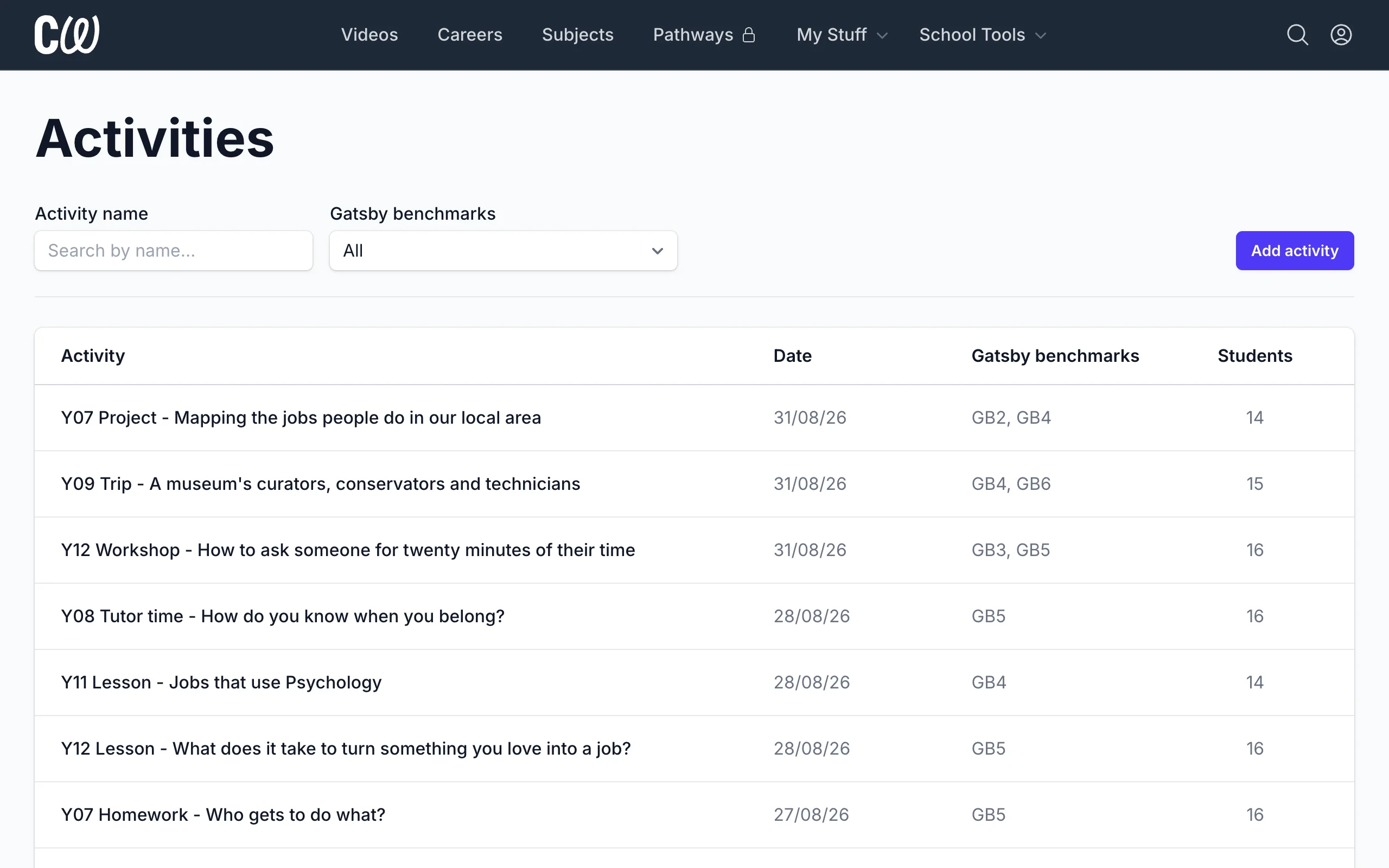
The Activities page allows you to add group activities for multiple students.
These group activities will be included in the report using the Gatsby benchmarks selected for the activity.
Summary vs Detailed reports
Both report types cover the same student activity. The difference is how much detail each row carries.
Summary reports include one consolidated row per student for each type of activity. For example:
Career profiles - Viewed 22 profiles
Career profiles - Added 6 favourites
Career profiles - Added 8 reflections
Subject guides - Viewed 5 guides
Subject guides - Added 4 favourites
Subject guides - Added 7 reflections
Career interviews - Watch 30 videos for 6 hours
Career interviews - Added 13 favourites
Career interviews - Added 16 reflections
Detailed reports include a separate row for every student for every activity. For example:
Career profiles - Viewed - Nutritional Therapist
Career profiles - Viewed - Dietitian
Career profiles - Viewed - Health Trainer
etc
Subject guide - Viewed - Biology
Subject guide - Viewed - Psychology
Subject guide - Viewed - Physical Education
etc
Career interview - Watched for 8 minutes - Sasha Gibbs, Nutritionist
Career interview - Watched for 9 minutes - Georgina Halabi, Performance & Wellbeing Coach
Career interview - Watched for 7 minutes - Olly Logan, Sports Performance Consultant
etc
Most schools prefer to use the Summary report for their Compass+ imports.
Things to know
- A Gatsby report can't start more than six months ago. Generate your reports each term rather than once a year.
- Students without a UPN on record still appear in the report but Compass+ may reject those rows when you upload the file.